Swarm: Running Coding Agents in Parallel
AI coding agents are often slow to work with because they make mistakes and go off the rails, requiring you to guide them. However, they can improve your development throughput when you run many of them in parallel. For example, you can have one agent working on a feature, another on a bug fix, and a third on an experiment. You give each agent its own branch and let it run until it has something for you to review and comment on. With this kind of development flow, the bottleneck is how many agents you can keep in flight without losing your mind.
Of course, in practice, running agents in parallel quickly turns into a mess. Every agent needs its own copy of the source tree so they do not step on each other's changes. Furthermore, every agent also needs its own terminal because they are long-running, interactive processes. Before long, you are drowning in terminal tabs, juggling git branches by hand, and trying to remember which worktree belongs to which agent. The overhead of keeping track of it quickly limits the parallelism you can actually have.
That is why I built Swarm. It is a desktop application for Linux that lets you run Claude Code, Codex, OpenCode, or any other CLI coding agent in parallel, each in its own isolated git worktree, each in a persistent terminal session, all managed from one place.
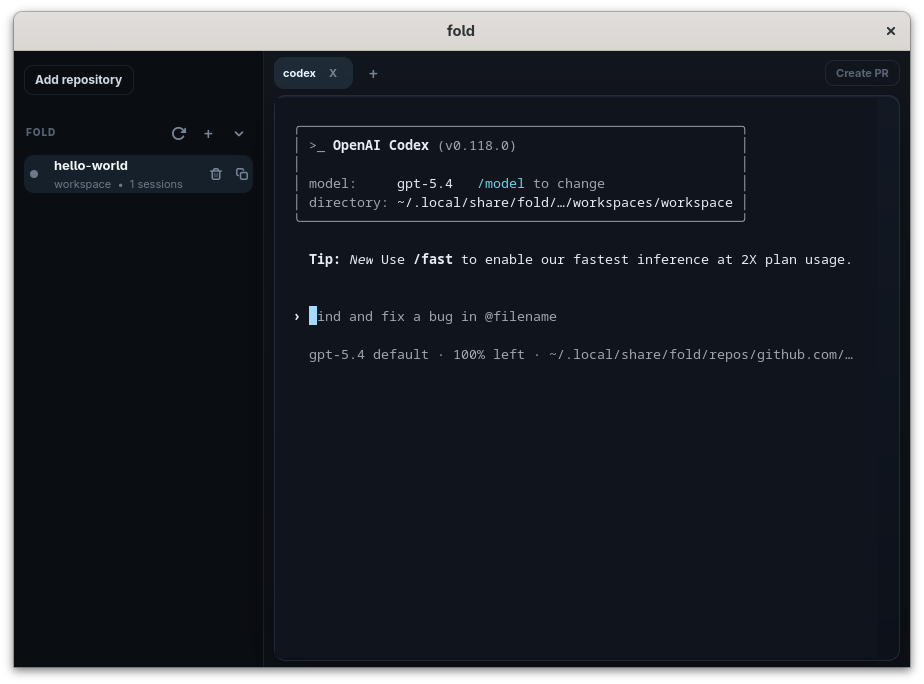
Swarm is a native GTK 4 application written in Rust. That is a deliberate choice. When you are running five or ten agents in parallel, you want to keep things organized and make switching between them effortless. A desktop app gives you a sidebar of repositories and workspaces, a row of tabs for sessions, and a real terminal view for each one. It is the same shape of UI you already use for code editors and chat apps, because the task is the same shape: many persistent things that you can quickly switch between.
Repositories, Workspaces, Sessions
Swarm provides an opinionated, agentic coding workflow by organizing work into three concepts, and the whole tool flows from them.
A repository is a git repository you have registered with Swarm. A workspace is an isolated copy of that repository, currently backed by a git worktree on disk, where work happens independently without interfering with anything else. A session is a persistent terminal running inside a workspace. For example, it could be a coding agent, a shell, a test runner, or any long-running command.
Sessions are what make this practical, day-to-day. Coding agents are not one-shot commands, but instead run for minutes or hours, stream output the whole time, and often want you to come back and answer a question. The session terminals use Ghostty's libghostty-vt crate. You can close the app, come back later, and reattach to the same session with the scrollback intact. The agent does not care that you stepped away.
Workflow
The unit of work for agents is the workspace. The opinionated workflow is one workspace per feature or bug fix:
- Create a workspace
- Start a coding agents and other development tools in it
- Let the agents and other tools work
- Open a pull request from Swarm
- Iterate on review and CI feedback
- Finally, remove the workspace after merging the change.
As every workspace is a separate git worktree, you can have as many of these in flight as you want without agents ever fighting over the same checkout or the same branch.
Once an agent has something worth reviewing, you want to get it into a pull request without leaving the tool. Swarm has a Create PR button in the workspace toolbar that pushes the workspace branch and opens a pull request for it. After that, the workspace toolbar shows the PR status, so you can see at a glance which of your in-flight workspaces have open reviews, which are green, and which need attention.
The review itself still happens in whatever tool you already use — GitHub in the browser, an editor, a code review tool. Swarm does not try to replace any of that. It just makes sure the workspace, the branch, the session, and the PR are all connected, so the handoff from "agent finished" to "humans reviewing" is one click instead of ten.
What It Is Not
Swarm is not a code review tool, a diff viewer, or an editor. There are good tools for all of those, and bundling them into every agent runner is what makes these things bloated. Swarm's scope is deliberately narrow: repositories, worktrees, and persistent terminal sessions. Anything that runs in a shell runs in Swarm, including every coding agent and every tool those agents might want to call.
Swarm is also fully local. There is nothing to sign into, no telemetry, no cloud component. It is a local tool that manages local state, and it stays out of your way.
What's Next
Swarm is early but already the way I run my own agents every day. The rough edges are getting sanded down release by release, and the direction from here is about making the parallel-agent workflow smoother end to end:
- Improve integration with forges beyond GitHub.
- Better visibility into what each agent is doing without having to attach to the session — notifications when an agent needs attention, a glance-level status for every workspace.
- Improve sandboxing with, for example, AgentFS so that workspaces are fast, but properly isolated.
- Remote workspace support when you want to run agents beyond your local machine.
- Integraton with Agent CI for faster feedback for agents.
The code is available at github.com/penberg/swarm. If you are running more than one coding agent at a time on Linux, give it a try.